
How to move your eBay photos to Shopify
Also in: Deutsch · Español · Français · Italiano
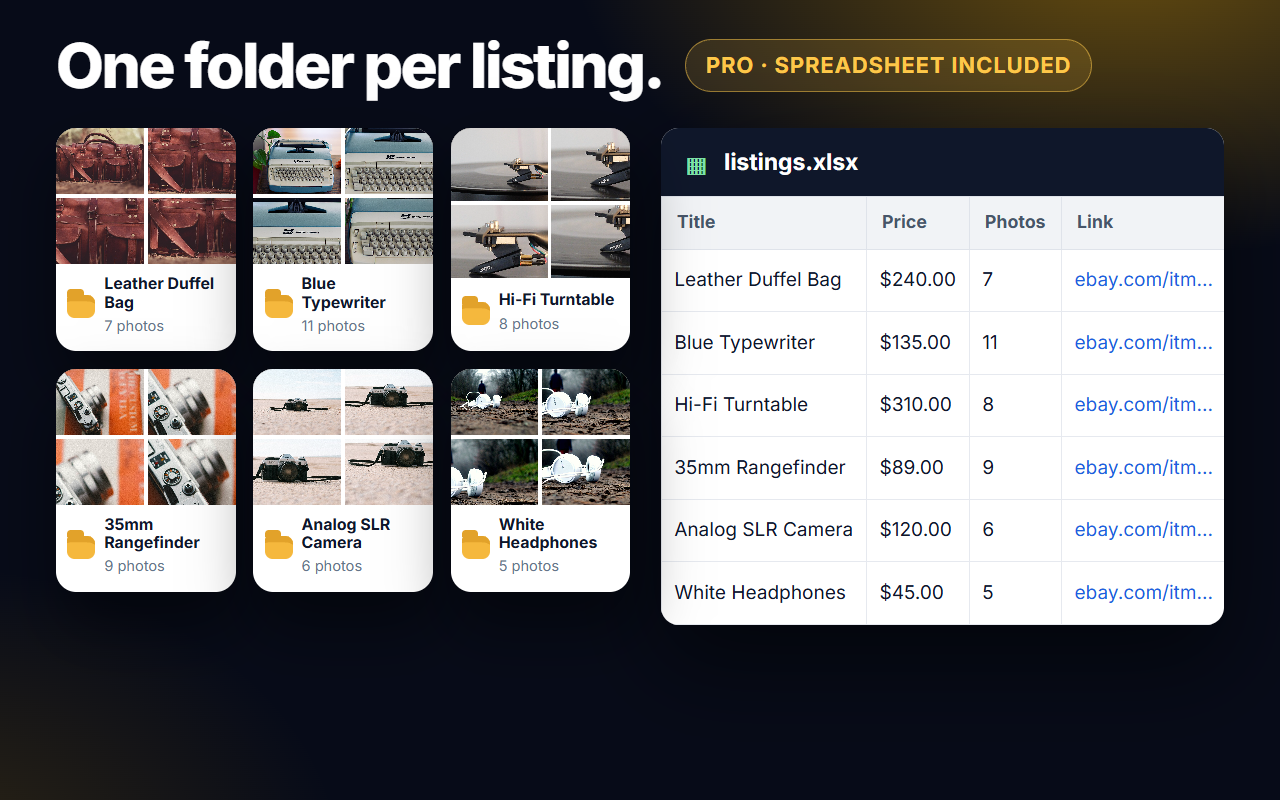
Short answer. Shopify takes product photos in two ways: you upload the files, or you import a CSV file in which each photo is a public address. For both you first need what eBay does not hand over: the photos of your listings, and their addresses. The Chrome extension eBay Image Downloader saves the photos of every listing in its own folder, with an Excel spreadsheet that holds the title, the price and the photo addresses of each listing. One listing is free. A whole store is $29 once.
What does Shopify ask for images?
From Shopify's help centre:
- Formats: JPEG, PNG, WEBP, HEIC and GIF.
- Largest file: 20 MB, and 20 megapixels.
- In a CSV import, the image goes in the "Product image URL" column. Shopify asks for a publicly accessible address: behind
https://, with no password. - Several images for one product: one row per image, with the same URL handle on each row.
- Required column to create products: Title. The URL handle is also required when a product has several rows.
eBay photos are up to 1600 px and about 1.5 MB as JPG on our test photo: well inside those limits.
How do I get my photos and their addresses out of eBay?
- Install eBay Image Downloader from the Chrome Web Store.
- Open your store page on eBay, or your active listings in Seller Hub.
- Click the extension icon, then "Find every listing". You see how many listings were found before paying anything.
- Download (Pro, $29 once).
You get one folder per listing with its photos numbered 01.jpg, 02.jpg, 03.jpg…, and listings.xlsx with one row per listing: Title, Price, Photos, Link, Photo links, Folder, Item ID.
Measured on a real store: 782 listings, 5,345 photos and 161 videos in 6 minutes. Details in how to save the photos of all your eBay listings at once.
Way 1: upload the files
Best for a small catalogue, or when you want to pick photos by eye.
- In Shopify, create a product.
- Drag the photos from the folder of the item into the media area.
- Copy the title and the price from the spreadsheet.
The files are then stored by Shopify. Nothing depends on eBay any more.
Way 2: import a CSV file with the photo addresses
Best for a large catalogue. The "Photo links" column of listings.xlsx holds the addresses of the full-size photos on eBay's image servers, separated by commas. They are public https:// addresses, which is what Shopify asks for.
Shopify wants one row per image, so the spreadsheet needs reshaping first:
- In a new sheet, create the columns Title, URL handle, Product image URL and Image position.
- For each listing, write one row per photo: the same URL handle on each, the title on the first row, one photo address per row, and the position 1, 2, 3…
- Add the price in Shopify's price column, as a plain number. The Price column of
listings.xlsxis text with the currency, as eBay shows it. - Save as CSV and import it in Shopify, under Products.
During the import, Shopify fetches each image from its address and stores its own copy.
Do the import soon after the download. eBay's help page says pictures stay in ended listings for up to 90 days, so the addresses of a listing you end will not work forever. The photo files in your folders stay yours either way.
Which way should I choose?
| Upload the files | Import by address | |
|---|---|---|
| Good for | up to a few dozen products | hundreds of products |
| Work per product | drag and drop, copy two fields | none after the file is built |
| Work up front | none | reshaping the spreadsheet |
| Depends on eBay addresses | no | only during the import |
Limits
- The extension gives you the photos and the spreadsheet. It does not build the Shopify CSV file for you.
- The spreadsheet holds the title, the price and the link of each listing, not the description text, the variants or the stock.
- Photos are up to 1600 px, the largest size eBay keeps.
- The whole-store download reads active listings. Sold and ended listings are not covered.
Questions
Does Shopify accept image addresses instead of files?
Yes, in a CSV import: the "Product image URL" column takes a publicly accessible https:// address, according to Shopify's help centre.
Can I put several photos on one product in the CSV?
Yes: one row per image, with the same URL handle.
Does Shopify accept WebP?
Yes. Its help centre lists JPEG, PNG, WEBP, HEIC and GIF.
Are eBay photos big enough for Shopify?
They are up to 1600 px. Shopify accepts files up to 20 MB and 20 megapixels.
Is it a subscription?
No. One listing at a time is free. A whole store is $29 once.
eBay Image Downloader is published by Modulia. Not affiliated with eBay Inc. or Shopify Inc.; eBay and Shopify are trademarks of their owners.
Last updated November 24, 2026